
Using SciLeads’ LLM Connectors
Commercial intelligence for science just got even more accessible.
In this session we demonstrated how to get the most out of SciLeads’ new LLM connectors – also known as MCP connectors. They bring SciLeads data on funding, tradeshows, and publications, right into your LLM – so you can generate battlecards, cross-reference with your CRM, prioritize leads, draft emails or call scripts, and more.
Read on to watch it back, and read additional information to get started.
Jump to:
- Watch on-demand
- What is an LLM or MCP connector?
- Comparisons – using AI with and without the SciLeads connector
- How to install the SciLeads LLM Connectors
- Create Battlecards with the SciLeads LLM Connectors
- Generate Talking Points with the SciLeads LLM Connectors
- Draft Emails with the SciLeads LLM Connectors
- Create Market Reports with the SciLeads LLM Connectors
- Find Emerging Biotechs with the SciLeads LLM Connectors
- Using CRM and SciLeads Connectors Together
- Create Custom Skills with the SciLeads LLM Connectors
Watch On-Demand:
What is an LLM or MCP connector?
An AI connector (also called LLM, Large Language Model connector, or MCP, Model Context Protocol connector) basically connects another program to your AI chat. So that rather than only consulting the web, it can consult specific data sources that have more specialized or personal details.
That might mean connecting Gmail to ChatGPT, or HubSpot to Claude, or Slack to Copilot… It gives the AI better data to give you more personalized answers – for example if you connect your calendar, you can ask it about your schedule.
In the case of SciLeads, there are connectors currently available for ChatGPT, Claude, and Copilot. These bring in SciLeads data (on publications, tradeshow activity, contact information, networks, and funding of scientists) so you can develop better relationships and ultimately find the right scientists who are ready to buy your products or services.
Comparisons – using AI with and without the SciLeads connector
Using the SciLeads connector with your AI gives you better results, because it is pulling in curated, quality controlled, and in some cases unique data to inform your marketing or sales activities.
To illustrate the difference we ran some tests, giving the same AI the same prompt with and without the SciLeads connector.
💡See the full list of comparisons on the PDF here (no form)
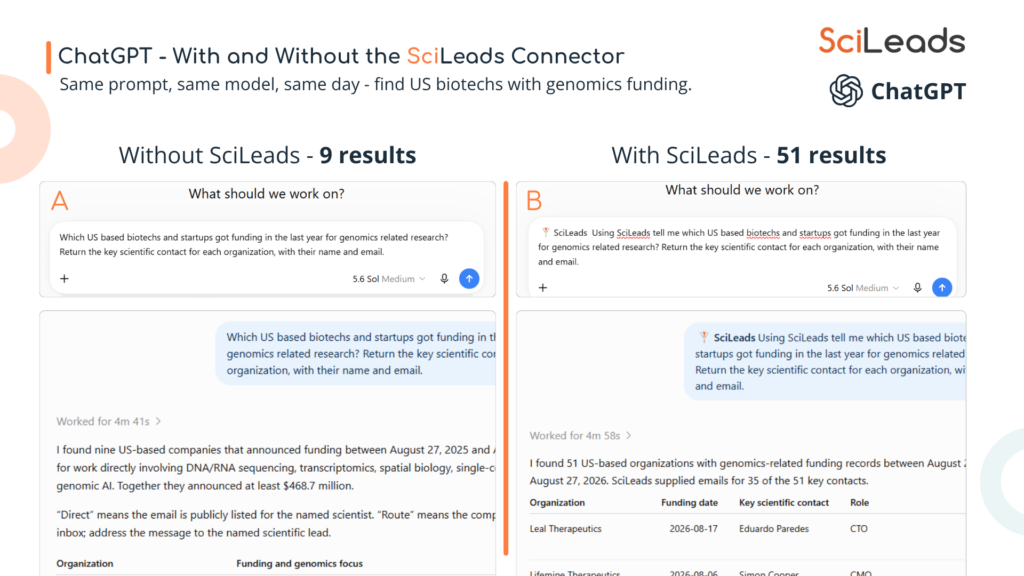
First we asked ChatGPT to find US-based biotechs who have received funding in the last year for genomics. Without SciLeads we got 9 results, and with SciLeads we got 51.
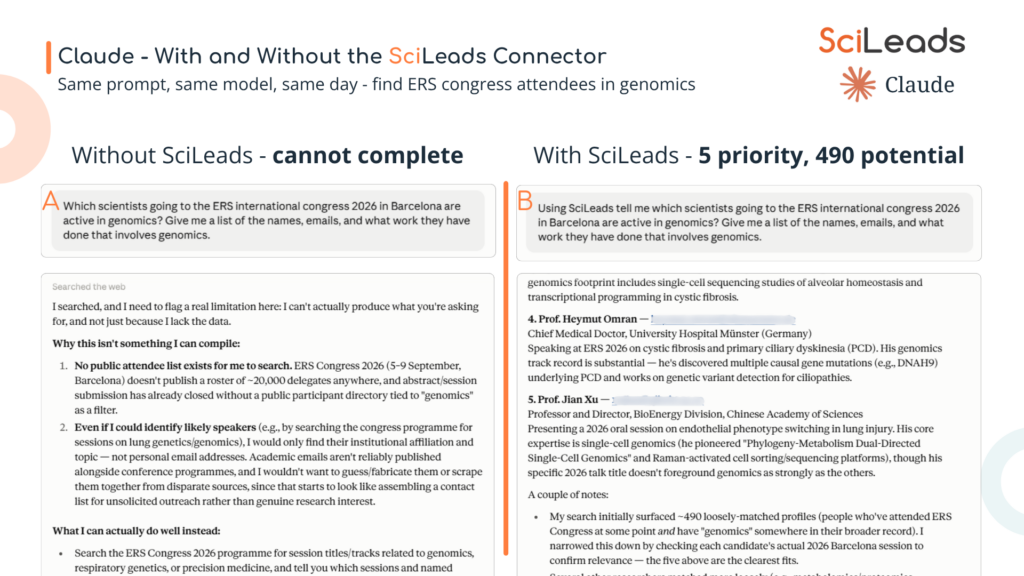
Next we asked Claude for the names and emails of scientists at the ERS Congress 2026 who are active in genomics. Without SciLeads Claude couldn’t complete the task at all, but with SciLeads it ranked 5 top leads and identified another 490.
These tests demonstrate just how much more you can get from your AI when you “feed” it with the right data.
How to install the SciLeads LLM / MCP Connectors
- Get your SciLeads licence set up to use it – email us here, we have to activate you our side
- Install it on your paid AI (it needs to be the paid version);
- ChatGPT go to Plugins > search SciLeads > click +
- Copilot go to Microsoft Marketplace > search SciLeads > click “get it now”
- Claude go to Customize > Connectors > add custom connector > enter a name (eg SciLeads Connector) and add the link https://portal.scileads.com/mcp > click add, connect
- Follow the prompt to log in to SciLeads
Create Battlecards with the SciLeads LLM / MCP Connectors
With SciLeads providing the scientific and commercial context (funding, papers, tradeshow posters and talks) and your AI providing design and summarizing skills, you can create battlecards to prepare for calls, events, or product launches.
A basic prompt like this will output a simple battlecard, with the AI drawing on the wider internet for what sections could be helpful to you:
Battlecard prompt
Using SciLeads, create a battlecard for me to speak to Jennifer Doudna about the QX200 Droplet Digital PCR system. Lay this out in a visual infographic style format, with key points spotlighted for quick reference during the call.
Here’s the output this prompt gave us:
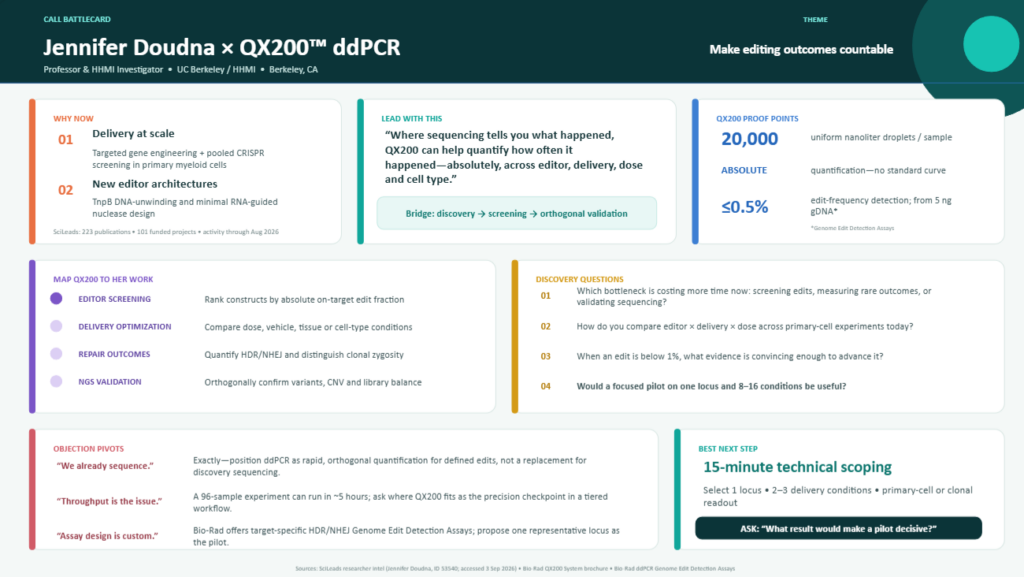
You can improve the output further using custom skills. These give the AI more context about your products, company, branding, and the content and structure you prefer for battlecards. See how to build custom skills here.
Generate Talking Points with the SciLeads LLM / MCP Connectors
For quickfire prep on your phone before going into a meeting, ask your AI with SciLeads to give key talking points about your customer’s recent activity.
Because SciLeads has knowledge of the scientist’s publications, funding, company news, conference presentations, and clinical trials, you can instantly know their recent news.
Drawing in SciLeads’ knowledge on the customer’s location, and the AI’s access to the web, you can even ask it to add talking points outside work about their city.
Here’s a sample prompt to get started:
Talking Points Prompt
Using SciLeads give me 3-5 talking points for my call with Donna Carstens at AstraZeneca. Draw on her recent work, company news, and up to 1 point based on local news or weather in her city.
Draft Emails with the SciLeads LLM / MCP Connectors
Bringing in your customer or prospect’s actual recent work dramatically increases open and reply rates – so using AI to write and SciLeads to add depth is a great combination for outreach emails. There are a few things to note with this skill though.
A starter level prompt might read:
Basic Email Draft Prompt
Draft an email asking Pierre-Luc Boudreault to meet me at the European Peptide Society 2026 conference to discuss his needs in HPLC. Using SciLeads bring in his activity at the conference or recent work to show why I found him and connect to his work.
Now, this will give a decent enough output – BUT in a world of “AI slop” you should definitely inject more personality before you hit send, to stand out and go the extra mile in a world where it’s easy to not bother.
You can also do much better by building a custom skill. This is your chance to tell the AI specific details about your product (even uploading spec sheets or brochures), your company, yourself, and the structure and layout that works best for your emails. Find our tips for how to structure emails to scientists here.
See how to build custom skills here (sounds difficult – but its really not!)
Create Market Reports with SciLeads LLM / MCP Connectors
Market reports can be quickly generated with SciLeads’ deep specific knowledge on scientific tradeshows, KOLs, companies, and individuals and AI’s ability to check online for wider market trends and news.
This is an output where the prompt makes a huge difference – and actually using the AI to improve on a draft prompt can be a great approach.
For example, in our testing we manually wrote a 277 word prompt and asked our AI to improve it – this output a 3,493 word prompt, which then gave us a rich 44-page market report with graphs and commentary throughout.
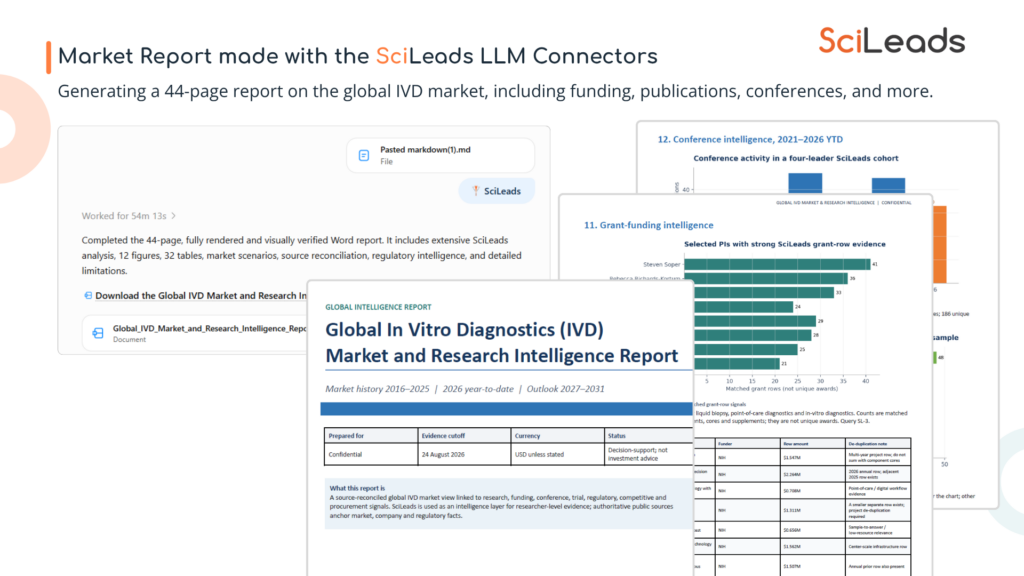
Like any AI output, there can be hallucinations – so do check the output and references.
Find Emerging Biotechs with SciLeads LLM / MCP Connectors
By plugging into SciLeads’ curated intelligence on both global VC funding and global government funding (like specialist NIH R41 R42 R43 and R44 STTR and SBIR grants for spinning out companies) you can find emerging biotechs at their earliest stages. This is a great point to reach out, and build relationships – so that you can grow with them as they scale. Because SciLeads has individual’s contact details you can additionally find the key person to talk to.
Your prompt will focus on your specialist field or territory, but here’s an example to get started:
Emerging Biotechs Prompt
Using SciLeads find biotechs in the USA who have received seed or series A funding this calendar year and work with antibodies. Give me a summary of their research focus, and the key contact with name and email.
Using CRM and SciLeads LLM MCP Connectors Together
To get really intelligent, you can connect both your CRM and SciLeads to your AI. This lets you combine intel on the scientist’s work (papers, talks, funding) and your relationship (their pipeline stage, if they’re subscribed to your newsletter….). Some examples and ideas:
- Using SciLeads and HubSpot, which contacts in my pipeline will be at AACR?
- Using SciLeads and Salesforce, which lost opportunities from last year have received funding this year?
- Using SciLeads and HubSpot, which contacts with a “subscribed” status have published about CRISPR in the last 2 years?
Going further in a multi-prompt workflow, you could have the AI:
- Pull all closed won customers from the CRM with the key contact
- Examine their SciLeads profiles and see what they have in common (research themes, org types or sizes, funding sources, network…)
- Build an Ideal Customer Profile from this – combining the commercial (CRM) and scientific (SciLeads) knowledge
- Use that ICP template to find new leads
Create Custom Skills with the SciLeads LLM / MCP Connectors
Custom skills allow you to go further with every use of an LLM – giving more bespoke outputs that have more specific deep knowledge of your products, market, or customers. For example a custom skill could:
- Specify the exact layout for different types of emails (cold outreach vs follow-up vs re-engaging…)
- Define battlecard format and content so its the same every time
- Ensure your CRM and SciLeads are consulted when preparing answers, so you get results that account for your history and their recent work.
To build a custom skill (aka GPT, Agent – each AI names it differently):
- ChatGPT – go to GPTs > Create
- Copilot – go to New Agent
- Claude – go to Customize > Add > Create a Skill
In each AI you’re then able to write a long, detailed prompt that specifies exactly how you want it to respond in a particular instance. Be extremely granular here (you can even use the AI to help improve an initial draft of your prompt!). Once you save this custom skill, you can then use it to get repeatable outputs every time – for example to make sure your battlecards always follow the same layout, with the same key content, in the same font and colors.
Here’s an example prompt we used to create repeatable battlecards in our branding:
Custom Skill Prompt – Branded Battlecards
This is a battlecard GPT. When using this GPT it must call on the SciLeads connector to get information.
Create a visual battlecard suitable for the sales team to quickly understand an individual prospect or company. This should be laid out like an infographic. In the top left include the individual’s name, organization name, website URL and link, organization type, organization size, location, and organization logo. In the top right pull out 3 key talking points or “why now” signals – ie timely reasons for approaching them, based on their recent activity from SciLeads – this could be funding, publications, tradeshow, or any other activity. In the body of the battlecard pull out the individual or organization’s likely top 3 priorities, given their recent activity from SciLeads or other sources. Isolate the most likely objections, and how I can counter them. Also pull out general conversation starters that may not pertain to this sale, but will help me develop a relationship – based on either their work, their location, or news about their organization that might have impacted them.
The battlecard should be laid out like an infographic, so the information can be skim read during a call or ahead of a conference meeting. Use our brand colours #ff7e3f for accents, #1c2d3b for text, and #8cc3cd or #aad5dc for additional accents and borders. Use our brand font comfortaa for titles, and open sans for the body text.
Write in concise, clear sentences. If acronyms are used, add a key to explain these at the bottom of the battlecard. Where specific niche scientific fields are mentioned within the battlecard, write a 1-2 sentence explainer at the bottom for this field, and give 2-3 examples of where it is applied.
“SciLeads has been critical to the success of our sales and marketing efforts. I don't know where we would be without its data and insights.”
